
Gestor de Atalhos do "Enviar Para"
Um pequenino programa
Ver código
Ver imagens
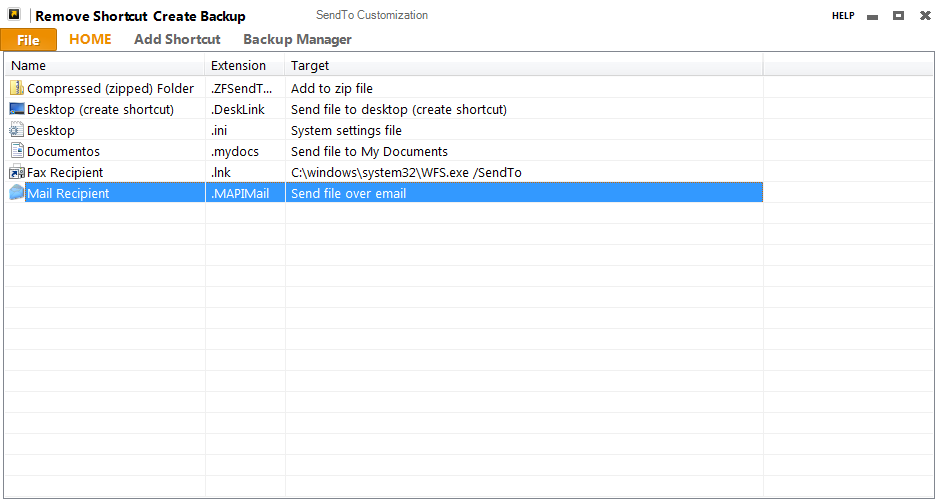
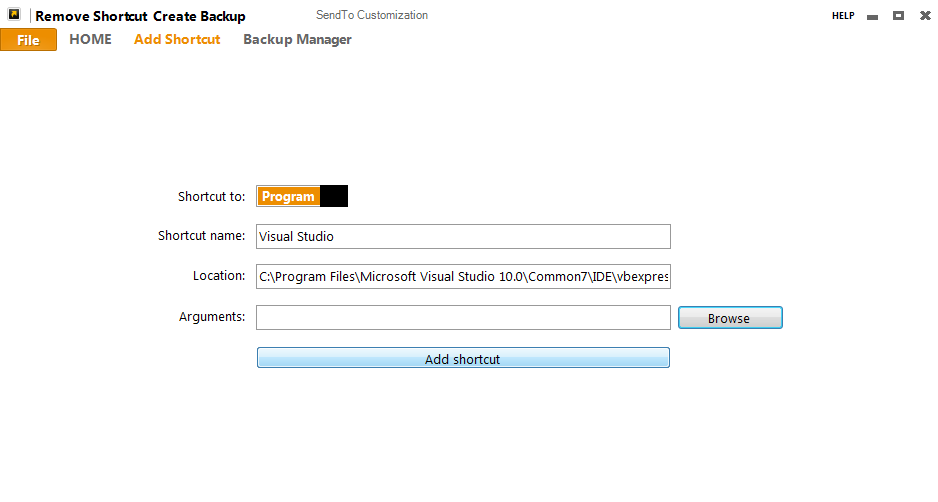
Código
Imports System.Runtime.InteropServices
Imports IWshRuntimeLibrary
Imports System.IO
Public Class Form1
Public Shared osVersion As Boolean
Private Structure SHFILEINFO
Public hIcon As IntPtr
Public iIcon As Integer
Public dwAttributes As Integer
_
Public szDisplayName As String
_
Public szTypeName As String
End Structure
Private Declare Auto Function SHGetFileInfo Lib "shell32.dll" _
(ByVal pszPath As String, _
ByVal dwFileAttributes As Integer, _
ByRef psfi As SHFILEINFO, _
ByVal cbFileInfo As Integer, _
ByVal uFlags As Integer) As IntPtr
Private Const SHGFI_ICON = &H100
Private Const SHGFI_SMALLICON = &H1
Private Const SHGFI_LARGEICON = &H0
Private nIndex = 0
Private Sub Form1_Load(sender As System.Object, e As System.EventArgs) Handles MyBase.Load
osVersion = My.Settings.w7
If osVersion = True Then
SwitchButtonItem1.Value = False
Else
SwitchButtonItem1.Value = True
End If
If osVersion = True Then
Dim nIndex As Integer = 0
For Each f As String In System.IO.Directory.GetFiles("C:\Users\" & Environment.UserName & _
"\AppData\Roaming\Microsoft\Windows\SendTo\")
Dim hImgSmall As IntPtr
Dim shinfo As SHFILEINFO
shinfo = New SHFILEINFO()
hImgSmall = SHGetFileInfo(f, 0, shinfo, _
Marshal.SizeOf(shinfo), _
SHGFI_ICON Or SHGFI_SMALLICON)
Dim myIcon As System.Drawing.Icon
myIcon = System.Drawing.Icon.FromHandle(shinfo.hIcon)
ImageList1.Images.Add(myIcon)
Dim fi As System.IO.FileInfo = New System.IO.FileInfo(f)
Dim fname As String = fi.Name.Remove(fi.Name.Length - fi.Extension.Length, fi.Extension.Length)
Dim itm As New ListViewItem(fname, nIndex)
itm.SubItems.Add(fi.Extension)
If fi.Extension = ".lnk" Then
Dim shell As WshShell = New WshShell()
Dim shortcut As WshShortcut = shell.CreateShortcut(f)
itm.SubItems.Add(shortcut.TargetPath() & " " & shortcut.Arguments)
ElseIf fi.Extension = ".DeskLink" Then
itm.SubItems.Add("Send file to desktop (create shortcut)")
ElseIf fi.Extension = ".ZFSendToTarget" Then
itm.SubItems.Add("Add to zip file")
ElseIf fi.Extension = ".mydocs" Then
itm.SubItems.Add("Send file to My Documents")
ElseIf fi.Extension = ".MAPIMail" Then
itm.SubItems.Add("Send file over email")
ElseIf fi.Extension = ".ini" Then
itm.SubItems.Add("System settings file")
End If
ListView1.Items.Add(itm)
nIndex = nIndex + 1
Next
Else
'Windows XP dirs
'C:\Documents and Settings\\SendTo\
Dim nIndex As Integer = 0
For Each f As String In System.IO.Directory.GetFiles("C:\Documents and Settings\" _
& Environment.UserName & "\SendTo\")
Dim hImgSmall As IntPtr
Dim shinfo As SHFILEINFO
shinfo = New SHFILEINFO()
hImgSmall = SHGetFileInfo(f, 0, shinfo, _
Marshal.SizeOf(shinfo), _
SHGFI_ICON Or SHGFI_SMALLICON)
Dim myIcon As System.Drawing.Icon
myIcon = System.Drawing.Icon.FromHandle(shinfo.hIcon)
ImageList1.Images.Add(myIcon)
Dim fi As System.IO.FileInfo = New System.IO.FileInfo(f)
Dim fname As String = fi.Name.Remove(fi.Name.Length - fi.Extension.Length, fi.Extension.Length)
Dim itm As New ListViewItem(fname, nIndex)
itm.SubItems.Add(fi.Extension)
If fi.Extension = ".lnk" Then
Dim shell As WshShell = New WshShell()
Dim shortcut As WshShortcut = shell.CreateShortcut(f)
itm.SubItems.Add(shortcut.TargetPath() & " " & shortcut.Arguments)
ElseIf fi.Extension = ".DeskLink" Then
itm.SubItems.Add("Send file to desktop (create shortcut)")
ElseIf fi.Extension = ".ZFSendToTarget" Then
itm.SubItems.Add("Add to zip file")
ElseIf fi.Extension = ".mydocs" Then
itm.SubItems.Add("Send file to My Documents")
ElseIf fi.Extension = ".MAPIMail" Then
itm.SubItems.Add("Send file over email")
ElseIf fi.Extension = ".ini" Then
itm.SubItems.Add("System settings file")
End If
ListView1.Items.Add(itm)
nIndex = nIndex + 1
Next
End If
'backups
If Form1.osVersion = True Then
Try
Dim Root As New DirectoryInfo("C:\Users\" & Environment.UserName _
& "\Documents\SendTo Backup\")
Dim Dirs As DirectoryInfo() = Root.GetDirectories("*.*")
For Each DirectoryName In Dirs
ListBox1.Items.Add(DirectoryName.ToString().Replace("'", ":"))
Next
Catch ex As Exception
MessageBox.Show("Ocorreu um erro")
End Try
Else
Dim Root As New DirectoryInfo("C:\Documents and Settings\" _
& Environment.UserName & "\My Documents\SendTo Backup")
Dim Dirs As DirectoryInfo() = Root.GetDirectories("*.*")
For Each DirectoryName In Dirs
ListBox1.Items.Add(DirectoryName.ToString().Replace("'", ":"))
Next
End If
End Sub
#Region "OSVersion Check"
Private Sub SwitchButtonItem1_ValueChanged(sender As Object, e As EventArgs) _
Handles SwitchButtonItem1.ValueChanged
If SwitchButtonItem1.Value = True Then
My.Settings.w7 = False
osVersion = False
reloadShortcuts()
Else
My.Settings.w7 = True
osVersion = True
reloadShortcuts()
End If
End Sub
#End Region
#Region "Add Shortcut Buttons"
Private Sub AddNewShortcutToolStripMenuItem_Click(sender As System.Object, e As System.EventArgs) _
Handles AddNewShortcutToolStripMenuItem.Click
MetroShell1.SelectedTab = MetroTabItem2
End Sub
#End Region
Public Sub reloadShortcuts()
If osVersion = True Then
Try
ListView1.Items.Clear()
ImageList1.Images.Clear()
Dim nIndex As Integer = 0
For Each f As String In System.IO.Directory.GetFiles("C:\Users\" _
& Environment.UserName & "\AppData\Roaming\Microsoft\Windows\SendTo\")
Dim hImgSmall As IntPtr
Dim shinfo As SHFILEINFO
shinfo = New SHFILEINFO()
hImgSmall = SHGetFileInfo(f, 0, shinfo, _
Marshal.SizeOf(shinfo), _
SHGFI_ICON Or SHGFI_SMALLICON)
Dim myIcon As System.Drawing.Icon
myIcon = System.Drawing.Icon.FromHandle(shinfo.hIcon)
ImageList1.Images.Add(myIcon)
Dim fi As System.IO.FileInfo = New System.IO.FileInfo(f)
Dim fname As String = fi.Name.Remove(fi.Name.Length - fi.Extension.Length, fi.Extension.Length)
Dim itm As New ListViewItem(fname, nIndex)
itm.SubItems.Add(fi.Extension)
If fi.Extension = ".lnk" Then
Dim shell As WshShell = New WshShell()
Dim shortcut As WshShortcut = shell.CreateShortcut(f)
itm.SubItems.Add(shortcut.TargetPath() & " " & shortcut.Arguments)
ElseIf fi.Extension = ".DeskLink" Then
itm.SubItems.Add("Send file to desktop (create shortcut)")
ElseIf fi.Extension = ".ZFSendToTarget" Then
itm.SubItems.Add("Add to zip file")
ElseIf fi.Extension = ".mydocs" Then
itm.SubItems.Add("Send file to My Documents")
ElseIf fi.Extension = ".MAPIMail" Then
itm.SubItems.Add("Send file over email")
ElseIf fi.Extension = ".ini" Then
itm.SubItems.Add("System settings file")
End If
ListView1.Items.Add(itm)
nIndex = nIndex + 1
Next
Catch ex As Exception
MessageBox.Show("Wrong Operative system! Go to ""Menu -> Windows Version"" and choose ""Windows XP""" _
, "SendTo Customization", MessageBoxButtons.OK, MessageBoxIcon.Error)
End Try
Else
Try
ListView1.Items.Clear()
ImageList1.Images.Clear()
Dim nIndex As Integer = 0
For Each f As String In System.IO.Directory.GetFiles("C:\Documents and Settings\" _
& Environment.UserName & "\SendTo\")
Dim hImgSmall As IntPtr
Dim shinfo As SHFILEINFO
shinfo = New SHFILEINFO()
hImgSmall = SHGetFileInfo(f, 0, shinfo, _
Marshal.SizeOf(shinfo), _
SHGFI_ICON Or SHGFI_SMALLICON)
Dim myIcon As System.Drawing.Icon
myIcon = System.Drawing.Icon.FromHandle(shinfo.hIcon)
ImageList1.Images.Add(myIcon)
Dim fi As System.IO.FileInfo = New System.IO.FileInfo(f)
Dim fname As String = fi.Name.Remove(fi.Name.Length - fi.Extension.Length, fi.Extension.Length)
Dim itm As New ListViewItem(fname, nIndex)
itm.SubItems.Add(fi.Extension)
If fi.Extension = ".lnk" Then
Dim shell As WshShell = New WshShell()
Dim shortcut As WshShortcut = shell.CreateShortcut(f)
itm.SubItems.Add(shortcut.TargetPath() & " " & shortcut.Arguments)
ElseIf fi.Extension = ".DeskLink" Then
itm.SubItems.Add("Send file to desktop (create shortcut)")
ElseIf fi.Extension = ".ZFSendToTarget" Then
itm.SubItems.Add("Add to zip file")
ElseIf fi.Extension = ".mydocs" Then
itm.SubItems.Add("Send file to My Documents")
ElseIf fi.Extension = ".MAPIMail" Then
itm.SubItems.Add("Send file over email")
ElseIf fi.Extension = ".ini" Then
itm.SubItems.Add("System settings file")
End If
ListView1.Items.Add(itm)
nIndex = nIndex + 1
Next
Catch ex As Exception
MessageBox.Show("Wrong Operative system! Go to ""Menu -> Windows Version"" and choose ""Windows Vista/7""" _
, "SendTo Customization", MessageBoxButtons.OK, MessageBoxIcon.Error)
End Try
End If
End Sub
#Region "Remove Shortcut Buttons"
Private Sub RemoveShortcutToolStripMenuItem_Click(sender As System.Object, e As System.EventArgs) _
Handles RemoveShortcutToolStripMenuItem.Click
If ListView1.SelectedItems.Count > 0 Then
Dim I As Integer
Dim files As String = Nothing
For I = 0 To ListView1.SelectedItems.Count - 1
files = files & ListView1.SelectedItems(I).Text & ListView1.SelectedItems(I).SubItems(1).Text & vbNewLine
Next
Dim res As DialogResult
res = MessageBox.Show("Are you sure that you wan't to delete these shortcuts?" & vbNewLine & _
files & vbNewLine & "This Operation can't be undone unless you've created a backup", "SendTo Customization", _
MessageBoxButtons.YesNo, MessageBoxIcon.Warning)
If res = Windows.Forms.DialogResult.Yes Then
Dim d As Integer
For d = 0 To ListView1.SelectedItems.Count - 1
If osVersion = True Then
System.IO.File.Delete("C:\Users\" & Environment.UserName & "\AppData\Roaming\Microsoft\Windows\SendTo\" _
& ListView1.SelectedItems(d).Text & ListView1.SelectedItems(d).SubItems(1).Text)
Else
System.IO.File.Delete("C:\Documents and Settings\" & Environment.UserName & "\SendTo\" & _
ListView1.SelectedItems(d).Text & ListView1.SelectedItems(d).SubItems(1).Text)
End If
Next
reloadShortcuts()
Else
ListView1.SelectedItems.Clear()
End If
Else
MessageBox.Show("No shortcuts selected!", "SendTo Customization", MessageBoxButtons.OK, MessageBoxIcon.Error)
End If
End Sub
#End Region
Private Sub Button1_Click(sender As Object, e As EventArgs) Handles Button1.Click
If SwitchButton1.Value = False Then
Dim res As DialogResult
res = FolderBrowserDialog1.ShowDialog()
If res = Windows.Forms.DialogResult.OK Then
TextBoxX2.Text = FolderBrowserDialog1.SelectedPath
End If
Else
Dim res As DialogResult
res = OpenFileDialog1.ShowDialog()
If res = Windows.Forms.DialogResult.OK Then
TextBoxX2.Text = OpenFileDialog1.FileName()
End If
End If
End Sub
Private Sub SwitchButton1_ValueChanged(sender As Object, e As EventArgs) Handles SwitchButton1.ValueChanged
If SwitchButton1.Value = False Then
TextBoxX3.Enabled = False
Else
TextBoxX3.Enabled = True
End If
End Sub
Private Sub ButtonItem1_Click(sender As Object, e As EventArgs) Handles ButtonItem1.Click
Process.Start("https://www.paypal.com/cgi-bin/webscr?cmd=_s-xclick&hosted_button_id=APKFBV27W67FS")
End Sub
Private Sub MetroShell1_HelpButtonClick(sender As Object, e As EventArgs) Handles MetroShell1.HelpButtonClick
HelpAbout.ShowDialog()
End Sub
Private Sub MetroShell1_TabIndexChanged(sender As Object, e As EventArgs) Handles MetroShell1.TabIndexChanged
ButtonItem2.Enabled = True
End Sub
Private WshShell As WshShellClass
Private Sub Button2_Click(sender As Object, e As EventArgs) Handles Button2.Click
If CreateShortcut(TextBoxX1.Text, TextBoxX2.Text, TextBoxX3.Text) = True Then
reloadShortcuts()
TextBoxX1.Text = ""
TextBoxX2.Text = ""
TextBoxX3.Enabled = False
End If
End Sub
Private Function CreateShortcut(ByVal shortCutName As String, ByVal shortCuttarget As String, _
Optional ByVal shortcutArguments As String = "")
Try
WshShell = New WshShellClass()
Dim MyShortcut As IWshRuntimeLibrary.IWshShortcut
If Form1.osVersion = True Then
MyShortcut = DirectCast(WshShell.CreateShortcut("C:\Users\" & Environment.UserName _
& "\AppData\Roaming\Microsoft\Windows\SendTo\" & shortCutName & ".lnk"), IWshRuntimeLibrary.IWshShortcut)
Else
MyShortcut = DirectCast(WshShell.CreateShortcut("C:\Documents and Settings\" & _
Environment.UserName & "\SendTo\" & shortCutName & ".lnk"), IWshRuntimeLibrary.IWshShortcut)
End If
MyShortcut.TargetPath = shortCuttarget
MyShortcut.Arguments = shortcutArguments
MyShortcut.WorkingDirectory = shortCuttarget
MyShortcut.Save()
Return True
Catch ex As Exception
MessageBox.Show(ex.Message.ToLower)
Return False
End Try
End Function
Private Sub ButtonItem3_Click(sender As Object, e As EventArgs) Handles ButtonItem3.Click
End
End Sub
Private Sub ButtonItem2_Click(sender As Object, e As EventArgs) Handles ButtonItem2.Click
If ListView1.SelectedItems.Count > 0 Then
Dim I As Integer
Dim files As String = Nothing
For I = 0 To ListView1.SelectedItems.Count - 1
files = files & ListView1.SelectedItems(I).Text & ListView1.SelectedItems(I).SubItems(1).Text & vbNewLine
Next
Dim res As DialogResult
res = MessageBox.Show("Are you sure that you wan't to delete these shortcuts?" & _
vbNewLine & files & vbNewLine & "This Operation can't be undone unless you've created a backup", _
"SendTo Customization", MessageBoxButtons.YesNo, MessageBoxIcon.Warning)
If res = Windows.Forms.DialogResult.Yes Then
Dim d As Integer
For d = 0 To ListView1.SelectedItems.Count - 1
If osVersion = True Then
System.IO.File.Delete("C:\Users\" & Environment.UserName & _
"\AppData\Roaming\Microsoft\Windows\SendTo\" & ListView1.SelectedItems(d).Text & _
ListView1.SelectedItems(d).SubItems(1).Text)
Else
System.IO.File.Delete("C:\Documents and Settings\" & Environment.UserName &_
"\SendTo\" & ListView1.SelectedItems(d).Text & ListView1.SelectedItems(d).SubItems(1).Text)
End If
Next
reloadShortcuts()
Else
ListView1.SelectedItems.Clear()
End If
Else
MessageBox.Show("No shortcuts selected!", "SendTo Customization", MessageBoxButtons.OK, MessageBoxIcon.Error)
End If
End Sub
Private Sub Button5_Click(sender As Object, e As EventArgs) Handles Button5.Click
Dim res As DialogResult
res = MessageBox.Show("Are you sure that you wan't to restore this backup?" & vbNewLine _
& "If you're not sure view the files that this backup contains!" & vbNewLine & _
"Remember! You can't undo this process!", "SendTo Backup Restore", MessageBoxButtons.YesNo, _
MessageBoxIcon.Question)
If res = Windows.Forms.DialogResult.Yes Then
If Form1.osVersion = True Then
For Each f As String In System.IO.Directory.GetFiles("C:\Users\" & _
Environment.UserName & "\AppData\Roaming\Microsoft\Windows\SendTo\")
Dim fi As System.IO.FileInfo = New System.IO.FileInfo(f)
System.IO.File.Delete(f)
Next
For Each f As String In System.IO.Directory.GetFiles("C:\Users\" & Environment.UserName & _
"\Documents\SendTo Backup\" & ListBox1.SelectedItem.ToString().Replace(":", "'"))
Dim fi As System.IO.FileInfo = New System.IO.FileInfo(f)
System.IO.File.Copy(f, "C:\Users\" & Environment.UserName & _
"\AppData\Roaming\Microsoft\Windows\SendTo\" & fi.Name)
Next
Else
For Each f As String In System.IO.Directory.GetFiles("C:\Documents and Settings\" _
& Environment.UserName & "\SendTo\")
Dim fi As System.IO.FileInfo = New System.IO.FileInfo(f)
System.IO.File.Delete(f)
Next
For Each f As String In System.IO.Directory.GetFiles("C:\Documents and Settings\" & _
Environment.UserName & "\My Documents\SendTo Backup\" & ListBox1.SelectedItem.ToString().Replace(":", "'"))
Dim fi As System.IO.FileInfo = New System.IO.FileInfo(f)
System.IO.File.Copy(f, "C:\Documents and Settings\" & Environment.UserName & "\SendTo\" & fi.Name)
Next
End If
MessageBox.Show("Backup restore completed...", "SendTo Backup Restore", MessageBoxButtons.OK, MessageBoxIcon.Information)
reloadShortcuts()
Me.Close()
End If
End Sub
Private Sub Button3_Click(sender As Object, e As EventArgs) Handles Button3.Click
Dim res As DialogResult = MessageBox.Show("Are you sure that you wan't to delete this backup?", _
"SendTo Backup Manager", MessageBoxButtons.YesNo, MessageBoxIcon.Question)
If res = Windows.Forms.DialogResult.Yes Then
If Form1.osVersion = True Then
For Each f As String In System.IO.Directory.GetFiles("C:\Users\" & _
Environment.UserName & "\Documents\SendTo Backup\" & _
ListBox1.SelectedItem.ToString().Replace(":", "'") & "\")
Dim fi As System.IO.FileInfo = New System.IO.FileInfo(f)
System.IO.File.Delete(f)
Next
System.IO.Directory.Delete("C:\Users\" & Environment.UserName & "\Documents\SendTo Backup\" &_
ListBox1.SelectedItem.ToString().Replace(":", "'"))
Else
For Each f As String In System.IO.Directory.GetFiles("C:\Documents and Settings\" & _
Environment.UserName & "\My Documents\SendTo Backup\" & _
ListBox1.SelectedItem.ToString().Replace(":", "'") & "\")
Dim fi As System.IO.FileInfo = New System.IO.FileInfo(f)
System.IO.File.Delete(f)
Next
System.IO.Directory.Delete("C:\Documents and Settings\" & Environment.UserName & _
"\My Documents\SendTo Backup\" & ListBox1.SelectedItem.ToString().Replace(":", "'"))
End If
MessageBox.Show("Backup deleted successfully!", "SendTo Customization", MessageBoxButtons.OK, MessageBoxIcon.Information)
ListBox1.Items.Clear()
If Form1.osVersion = True Then
Dim Root As New DirectoryInfo("C:\Users\" & Environment.UserName & "\Documents\SendTo Backup\")
Dim Dirs As DirectoryInfo() = Root.GetDirectories("*.*")
For Each DirectoryName In Dirs
ListBox1.Items.Add(DirectoryName.ToString().Replace("'", ":"))
Next
Else
Dim Root As New DirectoryInfo("C:\Documents and Settings\" & _
Environment.UserName & "\My Documents\SendTo Backup")
Dim Dirs As DirectoryInfo() = Root.GetDirectories("*.*")
For Each DirectoryName In Dirs
ListBox1.Items.Add(DirectoryName.ToString().Replace("'", ":"))
Next
End If
End If
If Form1.osVersion = True Then
Dim Root As New DirectoryInfo("C:\Users\" & Environment.UserName & "\Documents\SendTo Backup\")
Dim Dirs As DirectoryInfo() = Root.GetDirectories("*.*")
For Each DirectoryName In Dirs
ListBox1.Items.Add(DirectoryName.ToString().Replace("'", ":"))
Next
Else
Dim Root As New DirectoryInfo("C:\Documents and Settings\" & Environment.UserName & "\My Documents\SendTo Backup")
Dim Dirs As DirectoryInfo() = Root.GetDirectories("*.*")
For Each DirectoryName In Dirs
ListBox1.Items.Add(DirectoryName.ToString().Replace("'", ":"))
Next
End If
End Sub
Private Sub Button4_Click(sender As Object, e As EventArgs) Handles Button4.Click
If Form1.osVersion = True Then
Dim files As String = Nothing
For Each f As String In System.IO.Directory.GetFiles("C:\Users\" & _
Environment.UserName & "\Documents\SendTo Backup\" & ListBox1.SelectedItem.ToString().Replace(":", "'"))
Dim fi As System.IO.FileInfo = New System.IO.FileInfo(f)
files = files & fi.Name & vbNewLine
Next
MessageBox.Show("This backup contains the following files:" & vbNewLine & files, _
"SendTo Backup Restore", MessageBoxButtons.OK, MessageBoxIcon.Information)
Else
Dim files As String = Nothing
For Each f As String In System.IO.Directory.GetFiles("C:\Documents and Settings\" & _
Environment.UserName & "\My Documents\SendTo Backup\" & ListBox1.SelectedItem.ToString().Replace(":", "'"))
Dim fi As System.IO.FileInfo = New System.IO.FileInfo(f)
files = files & fi.Name & vbNewLine
Next
MessageBox.Show("This backup contains the following files:" & vbNewLine & files, _
"SendTo Backup Restore", MessageBoxButtons.OK, MessageBoxIcon.Information)
End If
End Sub
Private Sub ButtonItem4_Click(sender As Object, e As EventArgs) Handles ButtonItem4.Click
MessageBox.Show("This option will create an backup of all your shortcuts in your Documents folder." & vbnewline & _
Don't delete the folder called ""SendTo Backup"" or else all your backups will be deleted", _
"SendTo Customization", MessageBoxButtons.OK, MessageBoxIcon.Information)
If osVersion = True Then
If System.IO.Directory.Exists("C:\Users\" & Environment.UserName & "\Documents\SendTo Backup") = True Then
Dim now As String = DateAndTime.Now.ToString().Replace(":", "'").Replace("/", "-")
System.IO.Directory.CreateDirectory("C:\Users\" & Environment.UserName & "\Documents\SendTo Backup\" & now)
For Each f As String In System.IO.Directory.GetFiles("C:\Users\" & Environment.UserName _
& "\AppData\Roaming\Microsoft\Windows\SendTo\")
Dim fi As System.IO.FileInfo = New System.IO.FileInfo(f)
System.IO.File.Copy(f, "C:\Users\" & Environment.UserName & "\Documents\SendTo Backup\" & _
now & "\" & fi.Name)
Next
Else
Dim now As String = DateAndTime.Now.ToString().Replace(":", "'")
System.IO.Directory.CreateDirectory("C:\Users\" & Environment.UserName & "\Documents\SendTo Backup")
System.IO.Directory.CreateDirectory("C:\Users\" & Environment.UserName & "\Documents\SendTo Backup\" & now)
For Each f As String In System.IO.Directory.GetFiles("C:\Users\" & Environment.UserName & _
"\AppData\Roaming\Microsoft\Windows\SendTo\")
Dim fi As System.IO.FileInfo = New System.IO.FileInfo(f)
System.IO.File.Copy(f, "C:\Users\" & Environment.UserName & "\Documents\SendTo Backup\" & _
now & "\" & fi.Name)
Next
End If
Else
If System.IO.Directory.Exists("C:\Documents and Settings\" & Environment.UserName & _
"\My Documents\SendTo Backup") = True Then
Dim now As String = DateAndTime.Now.ToString().Replace(":", "'")
System.IO.Directory.CreateDirectory("C:\Documents and Settings\" & Environment.UserName & _
"\My Documents\SendTo Backup\" & now)
For Each f As String In System.IO.Directory.GetFiles("C:\Documents and Settings\" &_
Environment.UserName & "\SendTo\")
Dim fi As System.IO.FileInfo = New System.IO.FileInfo(f)
System.IO.File.Copy(f, "C:\Documents and Settings\" & Environment.UserName & _
"\My Documents\SendTo Backup\" & now & "\" & fi.Name)
Next
Else
Dim now As String = DateAndTime.Now.ToString().Replace(":", "'")
System.IO.Directory.CreateDirectory("C:\Documents and Settings\" & Environment.UserName &_
"\My Documents\SendTo Backup")
System.IO.Directory.CreateDirectory("C:\Documents and Settings\" & Environment.UserName &_
"\My Documents\SendTo Backup\" & now)
For Each f As String In System.IO.Directory.GetFiles("C:\Documents and Settings\" &_
Environment.UserName & "\SendTo\")
Dim fi As System.IO.FileInfo = New System.IO.FileInfo(f)
System.IO.File.Copy(f, "C:\Documents and Settings\" & Environment.UserName &_
"\My Documents\SendTo Backup\" & now & "\" & fi.Name)
Next
End If
End If
MessageBox.Show("Backup completed!", "SendTo Customization", MessageBoxButtons.OK, MessageBoxIcon.Information)
If Form1.osVersion = True Then
Dim Root As New DirectoryInfo("C:\Users\" & Environment.UserName & "\Documents\SendTo Backup\")
Dim Dirs As DirectoryInfo() = Root.GetDirectories("*.*")
For Each DirectoryName In Dirs
ListBox1.Items.Add(DirectoryName.ToString().Replace("'", ":"))
Next
Else
Dim Root As New DirectoryInfo("C:\Documents and Settings\" & Environment.UserName & "\My Documents\SendTo Backup")
Dim Dirs As DirectoryInfo() = Root.GetDirectories("*.*")
For Each DirectoryName In Dirs
ListBox1.Items.Add(DirectoryName.ToString().Replace("'", ":"))
Next
End If
End Sub
End Class
Imagens